Fix “Please wait while your request is being verified” (Imunify360 + Cloudflare)
Updated September 2026
A green spinner reading “Please wait while your request is being verified…” that never goes away — or a bare “403 Forbidden” from openresty — is almost always Imunify360 and Cloudflare disagreeing about cookies. Here's the mechanism, how to confirm it's your problem, and where the fix lives now that Page Rules are deprecated.
What you're seeing
Visitors get a green spinner and “Please wait while your request is being verified…”, which reloads and shows the same thing forever. Some requests instead return a plain “403 Forbidden” page footed by a server name like openresty — that's Imunify360's WebShield, which sits in front of your site on the server itself.
It's often intermittent and hits some visitors and not others, which makes it maddening to reproduce. Automated traffic — uptime monitors, SEO crawlers, checkout monitoring like Relvato — tends to hit it far more reliably than you do.
Why it happens: a cookie that never arrives
Imunify360's WebShield challenges a visitor it isn't sure about, and when the challenge passes it sets a cookie so the visitor isn't asked again. The whole mechanism depends on that cookie reaching the browser.
Cloudflare breaks that when it's caching your HTML with an overridden TTL. In Cloudflare's own words, describing Cache Everything: “Respects cache headers from the origin web server unless Edge Cache TTL is also set in the Page Rule. When combined with an Edge Cache TTL > 0, Cache Everything removes cookies from the origin web server response.”
So Cloudflare stores the challenge page and hands it to everyone, with the cookie stripped out. The visitor passes the check, gets a cached page back that still says “verifying”, and starts again. That's the loop — and neither product is misbehaving on its own.
Confirm it's this, in one command
Request your homepage and look at the headers: curl -sI https://example.com/ — on a normal WordPress site the HTML document should not be coming out of a CDN cache.
Two things together confirm the conflict. First, cf-cache-status: HIT together with an Age: header on the HTML document — Cloudflare is serving your page from its edge cache. Second, no Set-Cookie header on that response, because the cached copy has none to give. If you also see cf-edge-cache: cache,platform=wordpress, the Cloudflare WordPress plugin is the thing marking your HTML cacheable.
To confirm the other half, view the page source and search for imunify-bot-check. If that link is being injected into your pages, WebShield is actively verifying visitors.
Where the fix lives now (Page Rules are deprecated)
Every older write-up about this tells you to edit a Page Rule. Cloudflare has deprecated Page Rules in favour of dedicated products, so the settings have moved: caching now lives under Caching → Cache Rules.
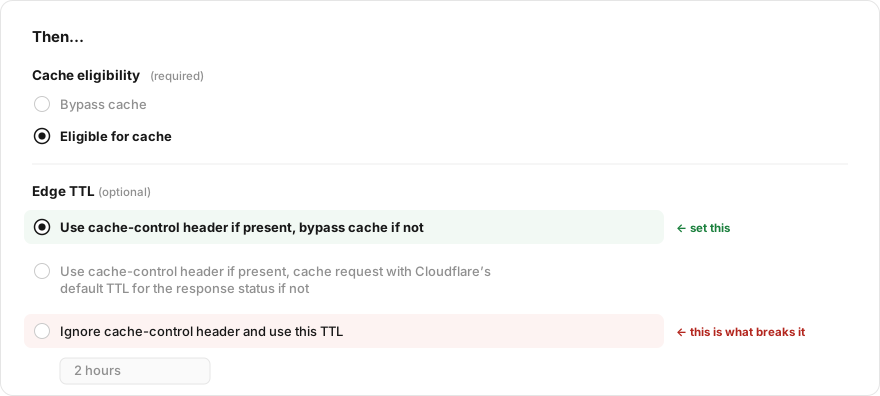
Open Caching → Cache Rules and open the rule that makes your HTML “Eligible for cache”. Scroll to its “Then…” section. Under Edge TTL, if “Ignore cache-control header and use this TTL” is selected, that is the modern name for the old Edge Cache TTL — and it is what strips the cookie. Select “Use cache-control header if present, bypass cache if not” instead, and save.
Then add a second rule, ordered above it, that keeps the challenge out of cache entirely: If URI Path contains /imunify-bot-check → Cache eligibility: Bypass cache. It's worth extending the same bypass to /wp-login.php and /wp-admin, which should never be served from a shared cache either.
Then purge, or you'll think it didn't work. Changing the rule stops the cache being refilled, but a copy stored before the change keeps being served until its old TTL runs out — on a two-hour TTL that's up to another two hours of the same loop. Go to Caching → Configuration → Purge Everything. Then re-check the headers: your HTML should stop coming back as cf-cache-status: HIT with an Age header.
If you use APO or the Cloudflare WordPress plugin
Automatic Platform Optimization caches your HTML at the edge deliberately, and it does know to bypass the cache when it sees WordPress's own login cookies. Imunify360's cookie is not one of them, so it doesn't trigger that bypass.
You can add your own bypass cookies, but only on Business and Enterprise plans — on Free and Pro that option isn't available. If you're on Pro and the loop survives the cache-rule changes above, turning HTML caching off (disable APO, or remove the rule that makes HTML eligible for cache) is the reliable way out. You keep caching for images, CSS and JS, which is where most of the benefit is anyway.
The origin side, and what to tell your host
Everything above is Cloudflare-side, and it is usually the whole fix. WebShield itself runs on your server, normally installed by your host, and there's often no switch for it in cPanel — so it's worth being certain the cache is genuinely fixed before you open a ticket.
That matters more than it sounds. On a real store we worked through, monitoring had been reporting hard HTTP 403s for days and looked exactly like a firewall block only the host could lift. After the Edge TTL change and a purge, every check passed on the very next run with nothing changed on the server — including the checkout page, which had never once completed. A cached challenge and a genuine block are indistinguishable from the outside.
If checks still fail once you've confirmed the cache is clear, then you are hitting WebShield itself and your host has to act. For monitoring specifically, Relvato sends a stable secret header on every request — X-Relvato-Token, shown in your site's Settings — so your host can allow exactly that traffic without weakening anything else. A CDN-level rule can't do this job: Imunify blocks at the origin, after Cloudflare has already passed the request through.
Old Page Rule advice, translated to today's dashboard
| Older articles say | Where it is now | What to set |
|---|---|---|
| Page Rule → “Cache Everything” | Caching → Cache Rules → Cache eligibility | Eligible for cache |
| Page Rule → “Edge Cache TTL” | Same rule → Edge TTL | NOT “Ignore cache-control header and use this TTL” |
| “Remove the Edge Cache TTL” | Same rule → Edge TTL | “Use cache-control header if present, bypass cache if not” |
| Bypass cache for the challenge | A Cache Rule ordered above it | URI Path contains /imunify-bot-check → Bypass cache |
| Bypass on a custom cookie | Cache Rules / APO bypass cookies | Business and Enterprise plans only |
Questions
Is this Imunify360's fault or Cloudflare's?
Neither, on its own. Imunify360 relies on a cookie to remember that a visitor passed its check, and Cloudflare — when told to cache HTML with an overridden TTL — caches the page and drops cookies from the origin response. Each behaves as documented; together they deadlock.
Will turning off HTML caching make my site slow?
Much less than you'd expect. Images, CSS, JavaScript and fonts are the bulk of what a browser downloads and they stay cached at the edge either way. You lose edge-cached HTML, which a decent server-side page cache (LiteSpeed Cache, WP Rocket) largely replaces.
Why does it only affect some visitors?
WebShield challenges what it considers suspicious, so most human visitors on ordinary connections sail past and never see it. Datacenter IPs and automated clients — monitors, crawlers, API consumers — are challenged far more often, which is why they surface the problem first.
I cleared the Cloudflare cache and it came back.
Purging empties the cache; it doesn't change the rule that refills it. Within minutes the challenge page is cached again. You have to change the Edge TTL setting or bypass the path, not just purge.
Can I fix this from cPanel?
Usually not. Imunify360 is installed and configured by your host at the server level, so most cPanel users have no WebShield controls. The Cloudflare-side changes are yours to make; anything inside Imunify360 has to go through your host.
Will this also fix my uptime monitor or crawler being blocked?
Very possibly, and it's worth testing before you blame anything else. Automated clients are challenged far more often than people, so they get stuck in the loop first and report it as a hard block. In the case above, monitoring that had failed with 403s for days went green on the next run after the cache fix, with nothing changed on the server. Fix the cache, purge, re-run — and only then chase your host.
My monitoring still gets blocked after fixing the cache.
Then you're hitting WebShield itself rather than the cache loop — the cache conflict and being blocked at the origin are two separate problems. Ask your host to allowlist the monitor's identifying header at the Imunify360 level; a Cloudflare rule can't bypass a firewall that runs behind Cloudflare.