Site drift: why websites break when nobody touched them
Your website broke after an update — or stopped working with no update at all? That’s site drift. “We didn’t change anything” is the most common sentence in website support — and it’s almost never true. Someone, or something, changed: an auto-update ran overnight, an AI assistant rewrote a component, a third-party script shipped a new version, a firewall rule tightened. This guide covers the ten causes of site drift we see most, what each one breaks, and how to catch it before your customers do.
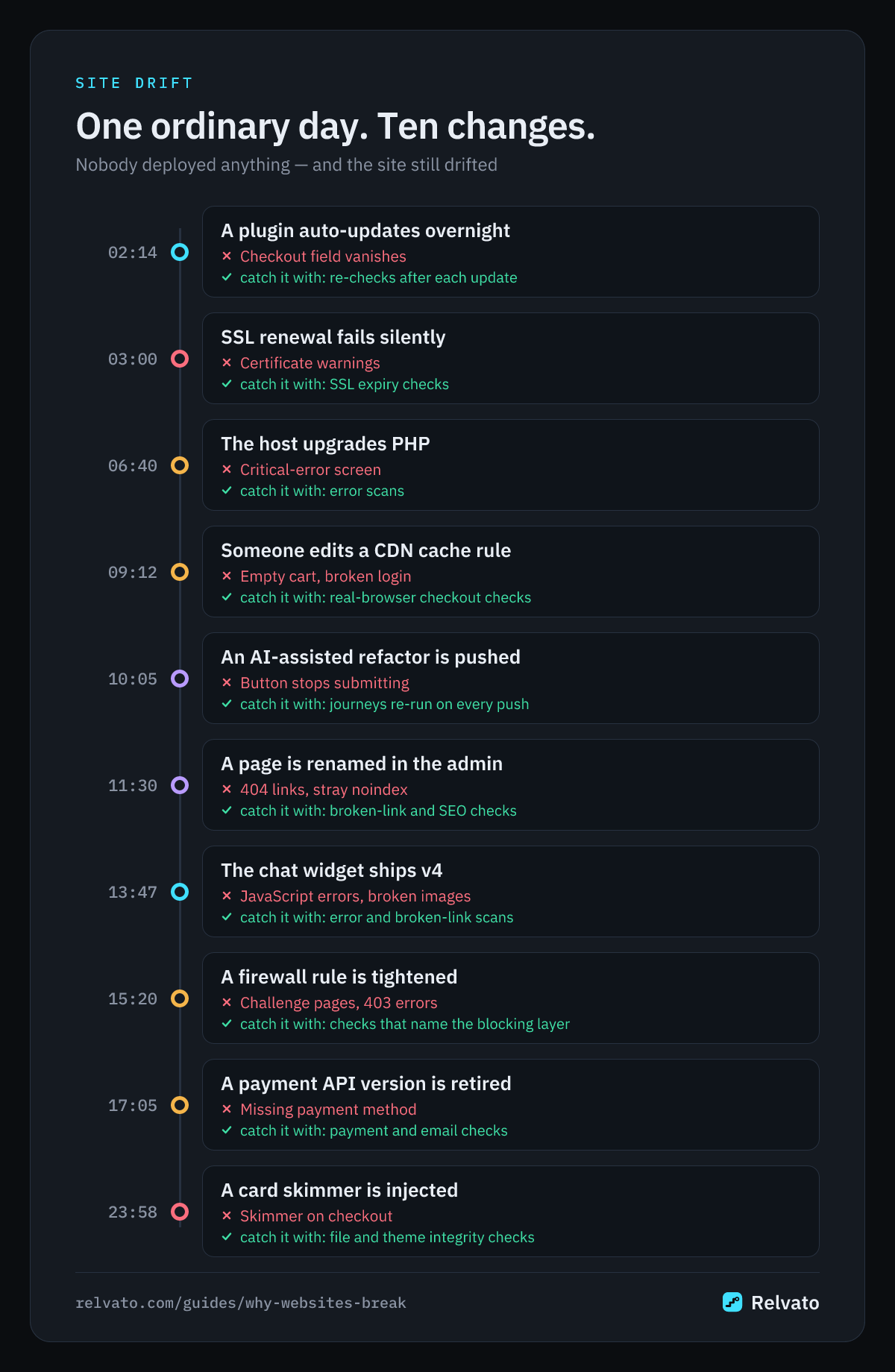
What site drift is
Site drift is the gap between the site you tested and the site your visitors get today. It builds up from changes nobody reviewed together: a plugin update here, a CDN setting there, a script that loads a newer version of itself. None of them looks dangerous on its own, and most are applied automatically.
Drift rarely shows up as a full outage. The homepage still loads, so uptime monitoring stays green. What breaks is a path: the add-to-cart button that no longer responds, a checkout field that vanished, an order-confirmation email that stopped arriving, a product image that returns a 404. Those are the failures that cost sales, and they are exactly the ones a simple ping can’t see.
Why “nobody touched it” is almost never true
A modern website is not one piece of software. A typical WordPress store runs WordPress core, a theme, twenty to fifty plugins, a PHP runtime, a web server, a cache, a CDN, a firewall, a payment gateway and a dozen third-party scripts — each maintained by a different team, each on its own release schedule, many set to update themselves.
A site built with AI tools or a modern framework has the same shape: generated code, npm dependencies, hosting defaults, edge configuration and external APIs. When something breaks, the question isn’t whether something changed — it’s which of these layers changed, and when. The ten causes below are where to look first.
1. WordPress core, plugin and theme updates
Updates are the single biggest source of site drift on WordPress — they are behind most “a WordPress update broke my site” reports — and most of them run unattended: minor core releases install automatically, and since WordPress 5.5 plugins and themes can auto-update too. An update that is fine in isolation can still conflict with another plugin, change a hook your theme relies on, or rename the CSS classes your customisations target.
WooCommerce adds its own trap: themes override WooCommerce templates, and when WooCommerce updates a template your theme’s outdated copy keeps rendering. The cart or checkout can lose a field or a nonce without any error on the page. The fix isn’t to stop updating — outdated plugins are a security risk — but to re-test the paths that matter — checkout, page structure and layout — right after each update runs. Relvato does exactly that: its WordPress plugin reports every plugin, theme and core update as it happens, and Relvato re-runs your checkout, visual and structure checks within minutes.
2. AI-generated code and vibe-coding regressions
AI coding tools make changes fast and broad. Ask an assistant to “tidy up the signup form” and it may also rename a route, drop a hidden field your CRM needed, remove the tracking attribute your analytics relied on, or regenerate a component from scratch without the edge case you fixed last month. Tools like Lovable, Bolt, v0 and Cursor can rewrite dozens of files in a single prompt.
The result is a regression that looks deliberate: the code is clean, it builds, and the page renders. Nothing crashes; a button just no longer submits, or a link points to a route that moved. Review catches some of it, but not what happens across a whole user flow. Re-running your key journeys after every push to GitHub — not just the unit tests — is what surfaces it. Relvato’s GitHub App does this on every push: it re-runs your real user journeys in a browser, so a dropped field or a moved route is flagged before customers find it.
3. Third-party scripts and external resources
Much of what your visitors run isn’t hosted by you: chat widgets, payment and fraud SDKs, tag managers, analytics, A/B testing tools, fonts, maps, review badges and images on a CDN. They update on their own schedule, and when you load them from the vendor’s URL, you get the new version the moment they ship it — or nothing, if they retire it.
The polyfill.io incident in 2024 showed the extreme case: a widely embedded script changed hands and started serving malicious code to more than 100,000 sites. The everyday cases are quieter — a chat widget that now blocks the checkout button on mobile, a tag manager container someone edited, a deprecated SDK endpoint returning an error, an image on a CDN that was deleted. Watch for uncaught JavaScript errors, broken external images and new script origins on your key pages.
4. Firewall, WAF and bot-protection changes
Security layers change without a deploy: a Cloudflare rule is tightened, a host enables Imunify360 or a stricter ModSecurity ruleset, a security plugin updates its blocklist, bot-fight mode gets switched on. Each can start challenging or blocking legitimate traffic — payment callbacks, webhooks, API requests from your own app, search engines and AI crawlers, or real customers on a VPN.
These failures are hard to see from inside: you are logged in, allowlisted or on a trusted IP, so everything works for you. Visitors see a “Please wait while your request is being verified” page or a 403. When monitoring gets blocked too, a good tool tells you which layer did it — the CDN edge, the host’s server firewall or a WordPress plugin — because each one is fixed in a different place (here’s how to allowlist monitoring).
5. Hosting, PHP and server changes
Hosts upgrade PHP versions, move accounts to new servers, change memory limits and swap web server configuration — sometimes with an email you didn’t read. Each PHP version deprecates or removes functions, so a plugin that worked yesterday can start printing “Deprecated” notices across your pages, or throw a fatal error that replaces checkout with WordPress’s “There has been a critical error on this website” screen.
Migrations bring their own drift: a different server path, a missing PHP extension, a cron that no longer runs so scheduled emails and subscription renewals stall, or file permissions that stop uploads. Scan your key pages for visible PHP and WordPress errors after any hosting change, and check that background jobs are still draining.
6. Caching and CDN configuration
Caching is invisible until it caches the wrong thing. A full-page cache or CDN rule that stores the checkout, the cart or a logged-in page can serve one customer’s session to another, show an empty cart, or break login and coupon flows for everyone. Cloudflare’s automatic platform optimisations and aggressive cache rules are common culprits when they are turned on without exclusions.
The reverse happens too: purging a cache after a deploy exposes a slow page that was hidden behind it, or a minification setting mangles a script. Because the failure depends on who requested the page first, it can come and go — which is why it needs a real browser to check the actual customer flow — like a logged-in checkout or login — not just a status code.
7. Everyday content and settings edits
Not every break comes from code. Someone renames a page and every menu link to the old URL now returns a 404. A product is deleted and its image disappears from three category pages. A “Discourage search engines from indexing this site” box ticked on staging is still ticked after launch. Guest checkout gets disabled while testing and never re-enabled.
These edits happen in the admin, often by people who don’t think of them as changes to the site. They are also the easiest to catch automatically: broken links and images on key pages, an unexpected noindex, and a checkout that suddenly asks guests to log in are all deterministic checks.
8. Things that quietly expire
Some breakages are scheduled the day you set something up. SSL certificates expire when automatic renewal fails silently. Domains lapse when a card on file expires. API keys and payment-gateway credentials get rotated or revoked. Premium plugin licences run out, so the plugin stops receiving the security and compatibility updates the rest of your stack assumes.
Expiry is the most avoidable kind of drift because the date is known in advance. Checking the certificate’s validity window, and testing the payment methods customers actually use, turns a surprise outage into a reminder.
9. Payment, shipping and API provider changes
Your checkout depends on services you don’t control. Payment providers retire API versions, change webhook formats and tighten Strong Customer Authentication rules; shipping and tax services change rates and endpoints; email providers adjust sending limits and authentication requirements. A gateway can quietly disappear from the checkout because its plugin now requires a newer setting.
The symptom is usually partial: most orders still go through, but one payment method is missing, 3-D Secure fails on some cards, or order-confirmation emails stop arriving. Verifying that each expected payment method is still offered, and that confirmation emails actually reach an inbox, catches these without placing real charges.
10. Security compromises
Attackers cause drift on purpose, and they try to keep it invisible. A vulnerable plugin is exploited to inject a card skimmer into the checkout, a backdoor file is dropped into the uploads folder, a theme template is modified, or a customer account is quietly promoted to administrator. The site keeps working — that is the point.
Catching this means comparing against a known-good state: core and plugin files against their official checksums, your theme’s files against an approved baseline, the list of administrators against the one you expect, and the external origins loading scripts on checkout against the ones you approved. Pair it with a vulnerability scan so you patch before the exploit, not after.
How to catch drift before your customers do
The pattern across all ten causes is the same: something outside your review process changed, and a user-facing path broke without an error you would notice. Scheduled checks help, but they leave a gap between the change and the next run. The most effective approach is to re-verify right after the changes that cause drift — a plugin, theme or core update, a push to your repository, a configuration change — and to keep a steady schedule for everything else.
Relvato is built around that idea. On WordPress, its plugin reports updates as they happen, and Relvato re-runs the checks that could be affected: checkout and login flows, visual regression and structure drift, error and broken-link scans, and file and theme integrity. On any stack, a push to a connected GitHub repository does the same. When a firewall blocks the checks, Relvato names the layer so you know where to allowlist it, and approved baselines keep intentional changes from alerting twice.
The 10 causes of site drift at a glance
| Cause | What drifts | Typical symptom | How to catch it |
|---|---|---|---|
| WordPress updates | Core, plugins, themes, WooCommerce templates | Missing checkout field, plugin conflict, restyled page | Re-run checkout, visual and structure checks after each update |
| AI-generated code | Components, routes, forms, tracking attributes | Button that no longer submits, moved route, dropped field | Re-run key journeys on every push |
| Third-party scripts | Widgets, SDKs, tag managers, CDN assets | JavaScript errors, blocked buttons, broken images, new script origins | Error scan, broken links, script-origin checks |
| Firewall and WAF | CDN rules, host firewall, security plugins | Challenge pages, 403s, blocked webhooks and crawlers | Checks that name the blocking layer |
| Hosting and PHP | PHP version, server, cron, extensions | Deprecated notices, critical-error screen, stalled jobs | Error scan and background-job checks |
| Caching and CDN | Page cache, cache rules, minification | Empty cart, broken login, stale or mixed sessions | Real-browser checkout and login journeys |
| Content and settings | Pages, menus, products, indexing and checkout settings | 404 links, missing images, noindex, guest checkout off | Broken-link, SEO and checkout checks |
| Expiring things | SSL, domains, API keys, licences | Certificate warnings, outages, missing updates | SSL expiry and payment-method checks |
| Payment and API providers | Gateway APIs, webhooks, email sending | Missing payment method, failed 3-D Secure, no confirmation email | Payment-method and email-delivery checks |
| Security compromises | Core and theme files, admins, checkout scripts | Skimmer on checkout, rogue admin, dropped backdoor | File and theme integrity, admin roster, vulnerability scan |
Site drift FAQ
What is site drift?
Site drift is the gradual difference between the site you last tested and the site visitors get now, caused by changes nobody reviewed together — automatic updates, third-party scripts, hosting and firewall changes, content edits. It usually breaks a path, like checkout or signup, rather than taking the whole site down.
Why did my website break if I didn’t change anything?
Because something else did. The most common culprits are automatic WordPress core, plugin or theme updates, a third-party script that shipped a new version, a hosting or PHP upgrade, a firewall or CDN rule change, or an expired certificate or API key. Check what updated or changed in the hours before the problem started.
Should I turn off WordPress auto-updates to stop drift?
Usually not. Outdated plugins are one of the main ways sites get compromised, so turning updates off trades drift for security risk. A safer approach is to keep updating and re-test your key paths — checkout, login, forms — automatically right after each update runs.
How do I catch breakage from AI-generated code?
Treat every AI-assisted change as a deploy: run the real user flows, not just the build. Checks that compare page structure and screenshots against an approved baseline catch dropped fields and moved buttons, and triggering them on every push to your repository catches the regression before users do.
How often should a website be checked?
Right after changes, plus on a regular schedule. Event-triggered checks catch drift within minutes of an update or deploy; a daily or weekly schedule covers the changes you can’t see coming, like an expiring certificate or a third-party script update.