Website monitoring webhook
Updated September 2026
A webhook sends every Relvato alert to a web address you choose, as a signed JSON request, so failures reach the tools your team already works in: an incident tool, a ticket queue, a chat app Relvato doesn't post to, or your own code. This page connects one, sends a test, and shows exactly what arrives. Email and Slack keep working alongside it.
Why use a webhook
Email and Slack are fixed destinations. A webhook is one integration that reaches anything with an HTTP endpoint, so the moment a check fails you can page whoever is on call, open a ticket with the error already filled in, or record the failure for a client report — without anyone copying details out of an email.
Every request carries the same structured fields — the site, the check, its severity, the error, what triggered the run and a link to it — so the receiving side can make decisions instead of parsing text: page someone only for critical checkout failures, file everything else as a ticket.
What you need first
Webhook alerts are on the Pro, Business and Agency plans.
You need an https address on the public internet that answers with any 2xx status within 10 seconds. That can be a small function of your own, or the webhook trigger of an automation tool: Zapier's Catch Hook, Make's Custom webhook or n8n's Webhook node all accept Relvato's JSON as it is.
Step 1 — Add the webhook URL
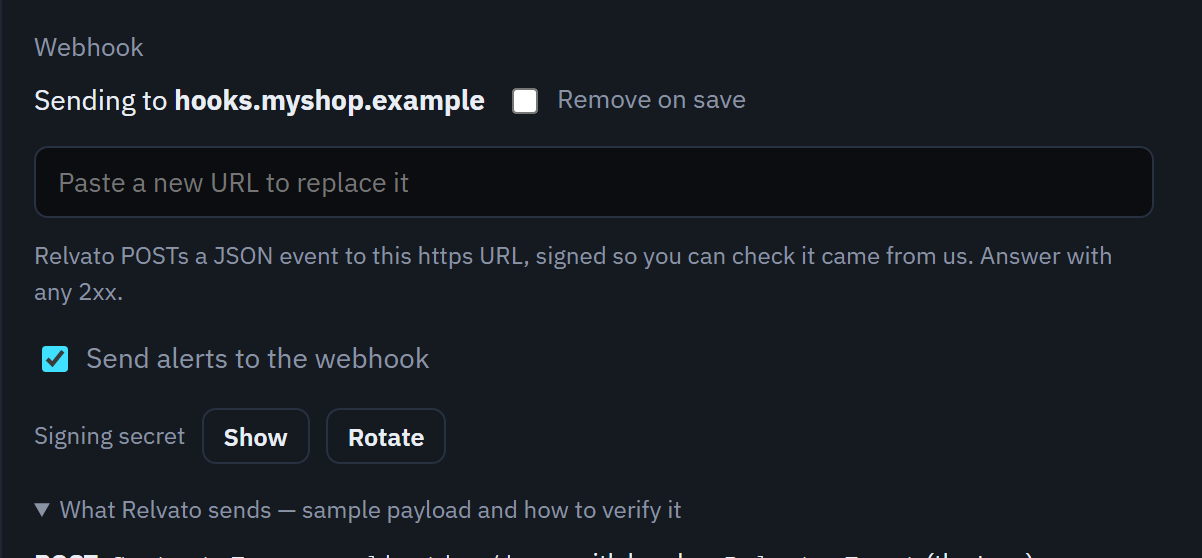
In Relvato, open the account menu at the top right and choose Alert settings. In the Webhook section, paste your address and click Save preferences.
Relvato only accepts https addresses that resolve to the public internet, and never follows redirects, so use the final address. Saving creates a signing secret for the webhook. Like a Slack webhook, the address can contain a token, so after saving the page only shows its host name.
Step 2 — Copy the signing secret
Next to Signing secret, click Show, then Copy, and store it where your receiver can read it — for example an environment variable called RELVATO_WEBHOOK_SECRET. It starts with whsec_.
Rotate makes a new secret straight away; the old one stops verifying, so update your receiver at the same time.
Step 3 — Send a test
Click Send test webhook at the bottom of the page. Relvato sends an event of type test, signed like a real one, and tells you whether your endpoint answered — for example “Test event delivered (HTTP 200)”. If it didn't, the message says why: no answer within 10 seconds, a redirect, or the status your endpoint returned.
Step 4 — Choose what goes to the webhook
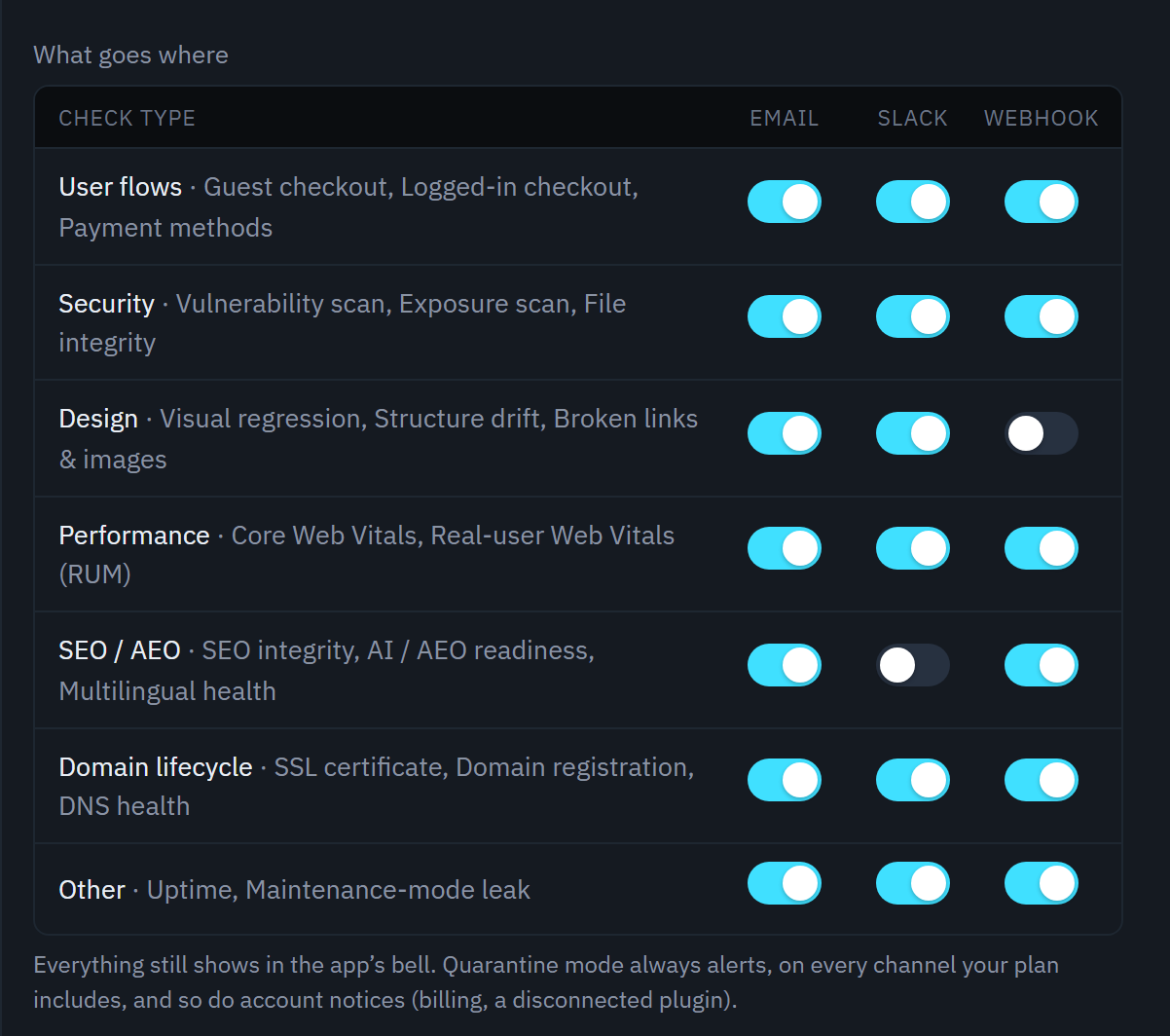
Under What goes where, the Webhook column has a switch per check type — User flows, Security, Design, Performance, SEO / AEO, Domain lifecycle and Other. Turn off the ones you don't want in your tools; email and Slack keep their own switches.
The rest of Alert settings applies too: Sites decides which sites alert, and Alert me on sets the lowest severity that's sent. The webhook is instant — keep As it happens ticked; the daily and weekly digests are email only.
What Relvato sends
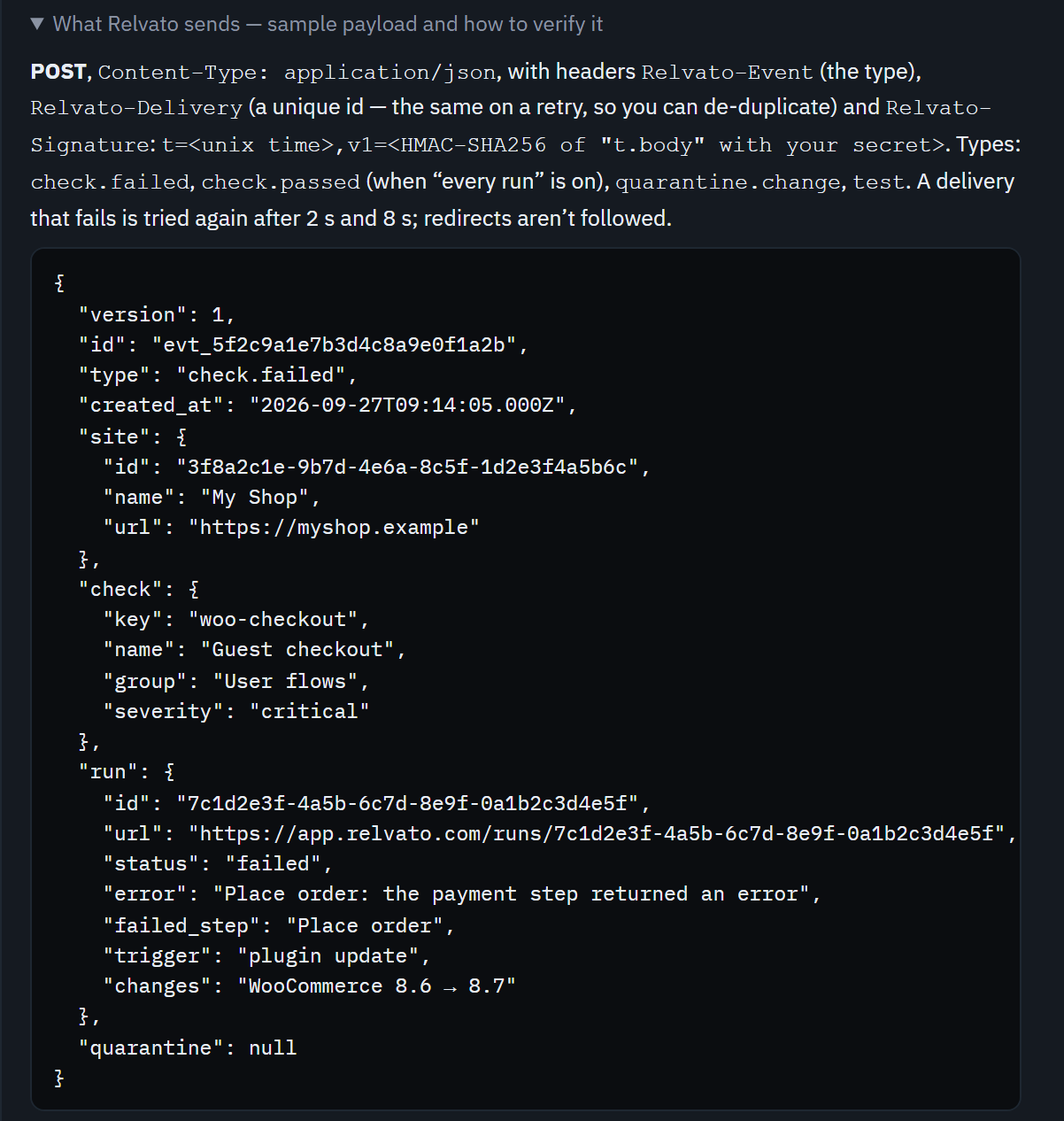
Each alert is a POST with Content-Type: application/json and three headers: Relvato-Event (the event type), Relvato-Delivery (a unique id that stays the same when a delivery is retried, so you can ignore duplicates) and Relvato-Signature.
There are four event types: check.failed when a check starts failing (or fails when you run it yourself), check.passed when “Tell me about every run” is on, quarantine.change for Quarantine mode's start, change and summary messages, and test from the button above. Every event has the same shape, with the parts that don't apply set to null.
Verify the signature
Relvato-Signature looks like t=1790000000,v1=… — t is the Unix time of the request and v1 is an HMAC-SHA256, keyed with your signing secret, of the timestamp, a dot and the raw request body. Recompute it over the body exactly as it arrived (not re-serialised JSON), compare in constant time, and refuse timestamps more than five minutes old, so a captured request can't be replayed later.
An automation tool's webhook trigger usually can't check signatures. That's fine for low-stakes uses such as logging; when a webhook can open incidents or change things, put a small function that verifies the signature in front of it.
import crypto from "node:crypto";
import express from "express";

const app = express();

// Keep the RAW body: the signature is over the exact bytes Relvato sent.
app.post("/relvato-webhook", express.raw({ type: "application/json" }), (req, res) => {
  const header = req.get("Relvato-Signature") ?? "";      // "t=1790000000,v1=5f2c…"
  const t = Number(/t=(\d+)/.exec(header)?.[1]);
  const v1 = /v1=([0-9a-f]{64})/.exec(header)?.[1] ?? "";
  const expected = crypto
    .createHmac("sha256", process.env.RELVATO_WEBHOOK_SECRET)
    .update(`${t}.${req.body}`)
    .digest("hex");
  const fresh = Math.abs(Date.now() / 1000 - t) < 300;    // refuse replays older than 5 minutes
  if (!fresh || v1.length !== 64 ||
      !crypto.timingSafeEqual(Buffer.from(v1), Buffer.from(expected))) {
    return res.sendStatus(401);
  }
  const event = JSON.parse(req.body.toString());
  res.sendStatus(200);                                     // answer fast, then do the slow work
  handle(event);                                           // switch on event.type
});
Practical examples
Page the on-call engineer. Send check.failed events into n8n or Make, keep the ones with severity critical — a broken checkout or payment step — and create an incident in PagerDuty or Opsgenie with the site, the error and the run link.
Open a ticket automatically. A Zapier Catch Hook can turn every failure into a Jira, Linear or GitHub issue: the check name as the title, the error and changes in the description, the run link to reproduce it.
Post to Microsoft Teams, Discord or Google Chat. These expect their own message format, so route the webhook through Make, n8n or Zapier and map Relvato's fields to the message.
Keep a failure log for client reports. Append one row per event to Google Sheets or your data warehouse, then report how often each site failed, which checks and how long fixes took.
Agencies: route by site. Every event carries site.id and site.name, so one webhook can send each client's alerts to that client's channel or project.
React to a bad deploy. When check.failed arrives with a deploy as its trigger, your pipeline can open a revert pull request for someone to approve — keep a person in the loop before anything changes on the live site.
Retries, duplicates and pausing
If your endpoint doesn't answer, times out after 10 seconds, or returns a 5xx or 429 status, Relvato tries again after 2 seconds and again after 8. Other 4xx statuses and redirects aren't retried — retrying wouldn't change the answer. Each delivery is logged on the run, and a failed one shows its reason in Alert settings.
A retry carries the same Relvato-Delivery id. Store the ids you've handled and skip repeats.
After 20 failed deliveries in a row, Relvato pauses the webhook and tells you: the notification bell shows “Webhook alerts paused” with the last error, and Alert settings shows it with a Resume button. Fix the receiver, then click Resume.
Change or remove the webhook
To point it somewhere else, paste the new address and save; the signing secret stays the same. To stop sending without losing the setup, untick Send alerts to the webhook. To remove it completely, tick Remove on save and click Save preferences — Relvato deletes the address and the signing secret; the privacy policy has the details.
Payload fields
| Field | What it holds |
|---|---|
| version | The payload version — 1. A change that could break a receiver gets a new version. |
| id | A unique event id, also sent as the Relvato-Delivery header. |
| type | check.failed, check.passed, quarantine.change or test. |
| created_at | When the event was created, in ISO 8601 (UTC). |
| site | id, name and url of the site — null on a test. |
| check | key, name, group (the check type) and severity: warning, low, medium, high or critical. |
| run | id, url (a link to the run in Relvato), status, error, failed_step, trigger and changes (what changed on the site just before). |
| quarantine | summary, the number of changes and log_url — only on quarantine.change, otherwise null. |
FAQ
Which plans include webhook alerts?
Pro, Business and Agency. Free alerts by email once a month and shows every failure in the dashboard; see pricing.
Can I send alerts to more than one webhook?
One webhook per Relvato account. To reach several tools, point it at an automation tool such as Zapier, Make or n8n and fan out from there.
Should I allowlist Relvato's IP addresses?
Verify the signature instead. It proves the request came from Relvato and wasn't changed, which an IP address can't.
Does the webhook include the screenshot?
No — the payload stays small and contains no images. run.url opens the run in Relvato, with its screenshot and every step.
Will I get the same alert twice?
Only if a delivery is retried after your endpoint didn't answer in time. The retry has the same Relvato-Delivery id, so you can skip it.
Does Relvato send a webhook when a check recovers?
Not as a separate event today. With “Tell me about every run” on, each passing run sends check.passed, which you can use to close what a check.failed opened.